
Introduction
In modern server management, containers have become as important as traditional servers. While virtualization allows multiple virtual machines on a single server, containerization goes one step further. Containers share the same operating system kernel but run applications in isolated environments.
Docker is the most popular tool for containerization. It allows developers and administrators to package applications with all dependencies, ensuring they run the same everywhere—on a developer’s laptop, staging server, or production environment.
In this class, we will explore the basics of Docker, the difference between containers and VMs, Docker Compose for multi-container apps, and an introduction to Kubernetes (K8s) for large-scale container orchestration.
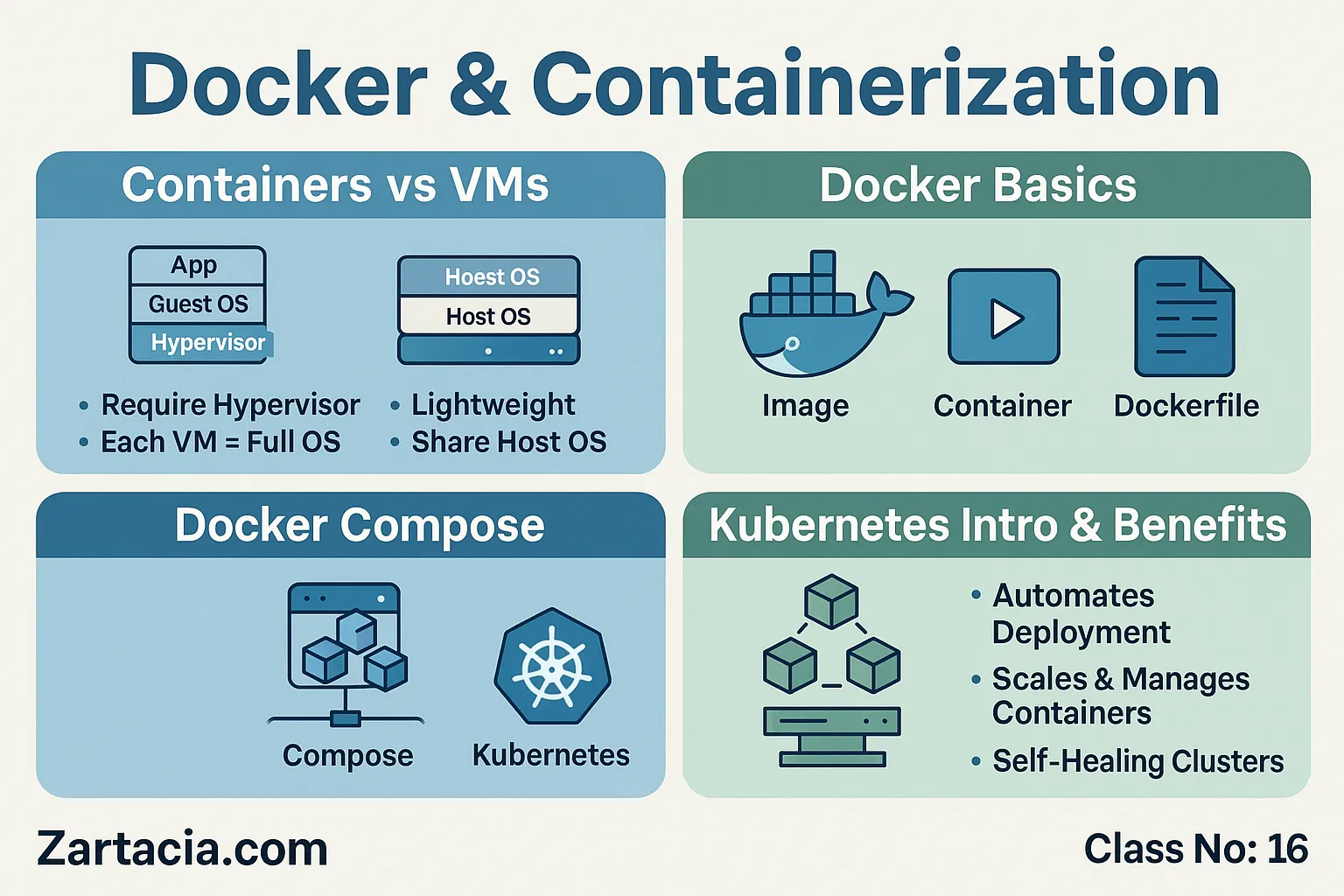
Containers vs Virtual Machines
Virtual Machines (VMs):
-
Require a hypervisor (like VMware or VirtualBox).
-
Each VM includes a full OS + application.
-
Heavy on resources (RAM, CPU, Disk).
Containers:
-
Lightweight, share the host OS kernel.
-
Run only the required application and dependencies.
-
Faster startup and lower resource usage.
Example:
A server can host 5–6 VMs, but the same server can run 50+ containers easily.
Docker Basics
Key Concepts:
-
Image: A snapshot of an application with all dependencies.
-
Container: A running instance of an image.
-
Dockerfile: A script that defines how to build an image.
-
Registry: A place to store images (Docker Hub, AWS ECR).
Basic Commands:
# Run a container
docker run -d -p 8080:80 nginx
# List running containers
docker ps
# Stop a container
docker stop <container_id>
Docker Compose – Multi-Container Apps
Some applications require multiple services, e.g., WordPress (PHP + MySQL + Apache). Docker Compose allows defining these services in one YAML file.
Example docker-compose.yml:
Running docker-compose up -d will launch WordPress + MySQL containers together.
Introduction to Kubernetes (K8s)
For large-scale projects, managing hundreds of containers manually is impossible. Kubernetes (K8s) automates deployment, scaling, and load balancing of containers.
Key Features:
-
Self-healing (restarts failed containers)
-
Auto-scaling based on traffic
-
Service discovery & load balancing
-
Rolling updates without downtime
Benefits of Containerization
-
Lightweight and resource-efficient
-
Consistency across environments
-
Easy deployment & scaling
-
Faster CI/CD pipelines
-
Ideal for microservices architecture
Example: Netflix, Uber, and Airbnb use containers to scale their global services efficiently.
Practical Task
-
Install Docker on your Linux server.
-
Run an Nginx container and access it on port 8080.
-
Use Docker Compose to set up WordPress + MySQL.
-
Explore Kubernetes with Minikube locally.
Student Section
Summary (150 words):
Docker and containerization have revolutionized server management by making applications lightweight, consistent, and scalable. Unlike virtual machines, containers use fewer resources and start instantly. Docker provides images, containers, and registries for efficient deployments. Docker Compose allows running multi-container apps like WordPress with ease. For large-scale systems, Kubernetes manages containers automatically, ensuring self-healing, load balancing, and scalability. With containers, organizations achieve faster deployments, stronger DevOps pipelines, and support for modern microservices.
Quiz:
-
What is the main difference between containers and VMs?
-
What is a Docker image?
-
Which file defines a multi-container setup?
-
Name one Kubernetes feature.
-
Why are containers important in DevOps?
Difficult Words Table:
| Word | Meaning in Urdu |
|---|---|
| Containerization | کنٹینر میں رکھ کر چلانا |
| Registry | ذخیرہ / رجسٹری |
| Orchestration | تنظیم / مربوط کنٹرول |
| Microservices | چھوٹی آزاد سروسز |
| Deployment | اطلاق / نفاذ |
FAQs
Q1: Is Docker replacing VMs?
No, Docker is complementary. VMs are still useful for OS-level isolation.
Q2: Can Docker run on Windows?
Yes, Docker Desktop supports Windows and macOS.
Q3: What is the best way to learn Kubernetes?
Start with Minikube or Docker Desktop’s K8s integration.
Q4: Is Docker free?
Yes, the community edition is free; enterprise features are paid.
Q5: Can containers improve security?
Yes, containers isolate applications, but they must be patched regularly.
Read More (Internal Links in Urdu)
-
یہ بھی پڑھیں: Virtualization and Cloud Hosting
-
یہ بھی پڑھیں: Server Automation with Scripts and Tools
-
یہ بھی پڑھیں: Server Security and SSL Certificates